Sunday Morning Checklist
River Oaks Church - Updated March 2025
Lighting
- Power on Hazers via "Lighting Control" page located on the audio Q-SYS screen.
- Ensure Vista is open on the worship-lighting iMac with the most recent showfile. If it's not open, you'll need to follow the instructions on opening it.
- Ensure Hazers on the left and right sides of the stage are filled up with Antari FLG-4 fluid (it is stored in the cabinet under the desk by the windows in tech storage).
- If it's summertime, ensure BOTH AC units in the Auditorium are set to fan "ON". –Check throughout rehearsal and first service. If it's winter, leave it on auto.
Lighting -- Important
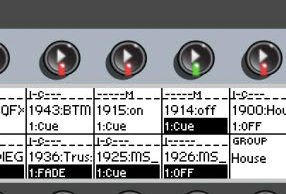
- There are two fixtures that have bulbs with limited runtime on them. These moving lights need to only be turned on for Sundays, and rehearsals. To turn them on, make sure only the ON cuelist is activated. Similarly, to turn them off, only have the off cuelist activated. (Pressing the buttons above them will toggle the activation)
Lyrics
- Ensure ProPresenter is open on worship-mains with the Playlist set to the correct service.
- Import sermon slides for Goshen and Espanol. More info available on the Importing Sermon Slides document.
- After the Sunday morning huddle, import the announcement slides. More info on the document here.
Live Stream
- Open and set profile in OBS on the broadcast-producer to Goshen Live. (Profile option is in the menu bar at the top of the screen)
- Power on cameras.
- Make sure the YouTube stream exists, if it doesn't, contact Israel Carrillo.
- Power on Broadcast Studio TV's. (There is currently no remote for them, so you'll need to reach behind them on the left size to press the power on button)
- Plug in (Or power on) the UltraStudio device, behind the online graphics Mac. This device gets unplugged when not in use due to the heat it puts off. Once it's plugged in and powered up, open ProPresenter on the broadcast-graphics mac.
Audio
- Power on audio system via Q-SYS touch screen
- Power on Green Room TV
- Set the stage based on the Planning Center stage layout
- Setup microphones and in ear packs according to the stage layout
Other
- Arm ProVideoPlayer with the correct playlist –See the Rearming ProVideoPlayer document for more information