Rearming ProVideoPlayer
River Oaks Church - Updated February 2026
Connecting
Using Finder on any auditorium Mac, navigate to Go and Connect to server.
Type in the following into the connect screen:
vnc://10.200.5.14
The username/password are as follows:
Username: worship
Password: [Password redacted]
(Please check Bitwarden for the password)
Rearming
On the left hand column of ProVideoPlayer, you will see different playlists for Goshen and Espanol. If it has the red mark by it, that means that it is armed and ready to be cued automatically. Depending on the service, you need to make sure that only the box is checked for the service you need or else backgrounds will be cued for the wrong service.
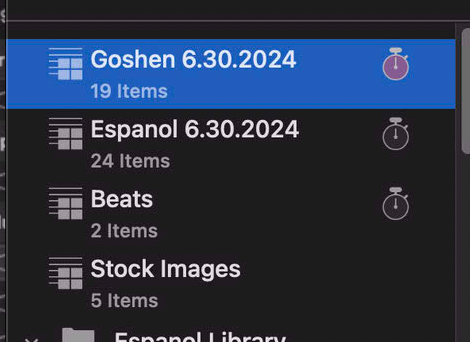
To change which box is checked, select or deselect the stopwatch icon on the right hand side after you select a playlist on the left column. (In the screenshot above, you'll see Goshen is selected.
